This feature is in beta. We encourage you to try it out and provide us with feedback.

When to Use Topic Discovery
- After each analysis run — check whether your topic hierarchy still reflects what customers are talking about. If not, consider selecting a broader or more specific topic.
- When mapped coverage drops — identify conversations falling outside your current topic set.
- When a new product or feature launches — monitor whether it generates new conversation topics that aren’t covered yet.
- During periodic QA reviews — spot topic overlap and consolidate redundant topics. Then update your AI Agent logic for more structured conversation handling. The next analysis run will reflect the changes in the topic hierarchy.
- When AI suggestions appear — evaluate whether the analyzer has detected emerging subtopics worth adding.
Restrictions
- A conversation can fall under multiple subtopics simultaneously, so subtopic counts may exceed the parent topic count.
Configuration
- In the left-side menu of the Insights interface, go to Configuration.
- In the Topic & Scheduler section, open the Evaluation Topic list.
-
Select the topic you want to evaluate, for example, Customer Service. Save changes. The LLM automatically detects subtopics such as Account Management or Billing Disputes based on conversation content. You don’t need to define subtopics manually.

Charts
Top Rising Topic
Shows the topic with the highest increase in conversation volume between the last two analysis runs. The number displayed reflects how many conversations matched this topic in the most recent run. Use this to catch sudden spikes in a specific topic before they become a support issue. Example: Between Monday and Tuesday’s runs, conversations about fraud alerts jumped from 12 to 89. Top Rising Topic surfaces this immediately, prompting the team to investigate whether a phishing campaign is driving the spike.Mapped Coverage
Shows the percentage of conversations covered by the topics the LLM identified within the selected evaluation topic. A high percentage means most conversations are being categorized. A low percentage suggests your topics may not reflect what customers are actually discussing. Example: Mapped Coverage shows 74%. The remaining 26% represents conversations that matched none of the topics in the current hierarchy, suggesting other topics may need to be analyzed.Topic Overlap
Shows the overlap between different topics based on conversation content. High overlap between two topics may indicate they are too similar, or that a parent-child relationship between them would be more accurate. Example: The card disputes and fraud alerts topics show 61% overlap, suggesting fraud alerts could be restructured as a subtopic under card disputes.New Topics Found
Shows the number of conversations that didn’t match any of your selected topics. Reviewing this after each run helps you identify subject areas your topic hierarchy doesn’t cover yet. Adding these topics improves mapped coverage over time. Example: After a product update introducing a new savings tier, New Topics Found increases by 43. Reviewing these conversations reveals customers are asking about premium savings. This topic isn’t in the hierarchy yet.Topic Hierarchy
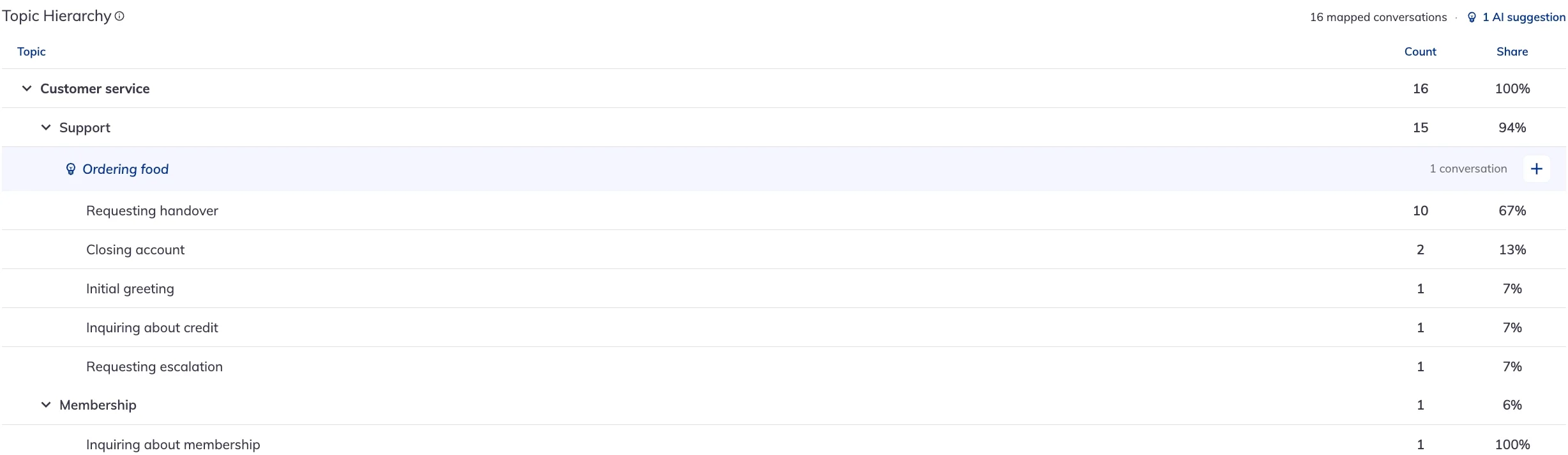
Displays all topics found in your conversations, organized by topic, subtopic group, and subtopic. Each topic shows how many conversations it covers.- A single conversation can match multiple subtopics, so subtopic counts may exceed the topic count. This behavior is expected, not an error.
-
AI-suggested topics appear beneath their parent topic. Click + next to a suggestion to add it to the hierarchy. The + button appears only when the LLM has suggestions for the selected topic.