> ## Documentation Index
> Fetch the complete documentation index at: https://docs.cognigy.com/llms.txt
> Use this file to discover all available pages before exploring further.
# Webchat v2 (Deprecated)
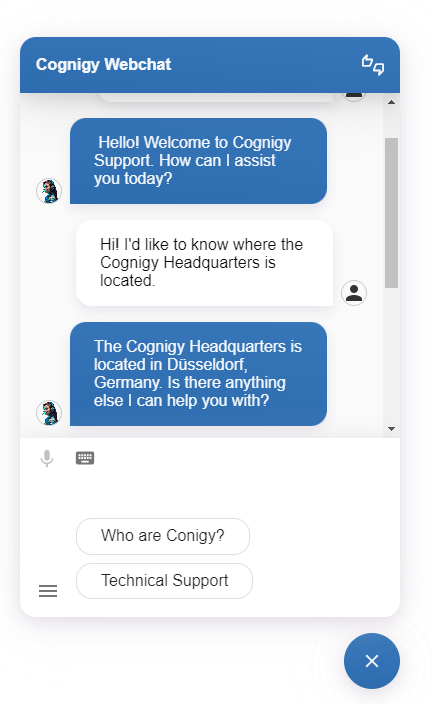
> Cognigy Webchat v2 is a chat widget featuring CSS customization, persistent chat history, and WCAG 2.0 Level AA compliance.
As of Cognigy.AI 4.83.0, Webchat v2 is deprecated. Webchat v2 will be retired in February 2026. During this time, only important security updates will be provided for v2, with no further feature additions.
Before support for Webchat v2 ends, [migrate](https://docs.cognigy.com/webchat/migration/) to Webchat v3.
*Webchat v2* is a stable version of Cognigy Webchat, which is compatible with any version of Cognigy.AI.
Benefits of Webchat v2:
* **User Interaction**. Users can interact with your Conversational AI system directly through the Webchat widget. It provides a graphical chat interface for a smooth user experience.
* **Customization**. Using CSS allows you to match the Webchat's appearance to your website's design. You can tweak parameters such as widget colors, fonts, buttons, input/output styles, and even avatars.
* **Persistent Chat History**. Webchat retains chat history, ensuring continuity even during in-app navigation. Users can seamlessly continue conversations without losing context.
* **Easy Embedding**. JavaScript embedding allows you to integrate Webchat into your website effortlessly.
* **Adherence to Accessibility Guidelines**. Webchat v2 is fully aligned with WCAG 2.0 Level AA guidelines, guaranteeing enhanced readability, seamless navigation, and interactive functionality within the interface.
 ## How to Start with Webchat v2?
Start by reading the documentation provided for Webchat v2.
These articles give you a fundamental understanding of its features,
configuration, and how to integrate it into your project:
1. [Key Features](/webchat/v2/features). Explore the Webchat v2 features.
2. [Supported Browsers](/webchat/v2/supported-browsers). Explore the supported browsers for Webchat v2.
3. [Configuration](/webchat/v2/configuration). Create a Webchat v2 Endpoint and customize various settings within it.
4. Test your Webchat v2 using the embedded [Demo Webchat](/webchat/demo) within the Endpoint settings, or build Webchat v2 locally using [developer tools](https://github.com/Cognigy/WebchatWidget?tab=readme-ov-file#building-your-webchat).
5. [Embedding](/webchat/v2/embedding). Launch the Webchat v2 version on your website.
## How to Start with Webchat v2?
Start by reading the documentation provided for Webchat v2.
These articles give you a fundamental understanding of its features,
configuration, and how to integrate it into your project:
1. [Key Features](/webchat/v2/features). Explore the Webchat v2 features.
2. [Supported Browsers](/webchat/v2/supported-browsers). Explore the supported browsers for Webchat v2.
3. [Configuration](/webchat/v2/configuration). Create a Webchat v2 Endpoint and customize various settings within it.
4. Test your Webchat v2 using the embedded [Demo Webchat](/webchat/demo) within the Endpoint settings, or build Webchat v2 locally using [developer tools](https://github.com/Cognigy/WebchatWidget?tab=readme-ov-file#building-your-webchat).
5. [Embedding](/webchat/v2/embedding). Launch the Webchat v2 version on your website.